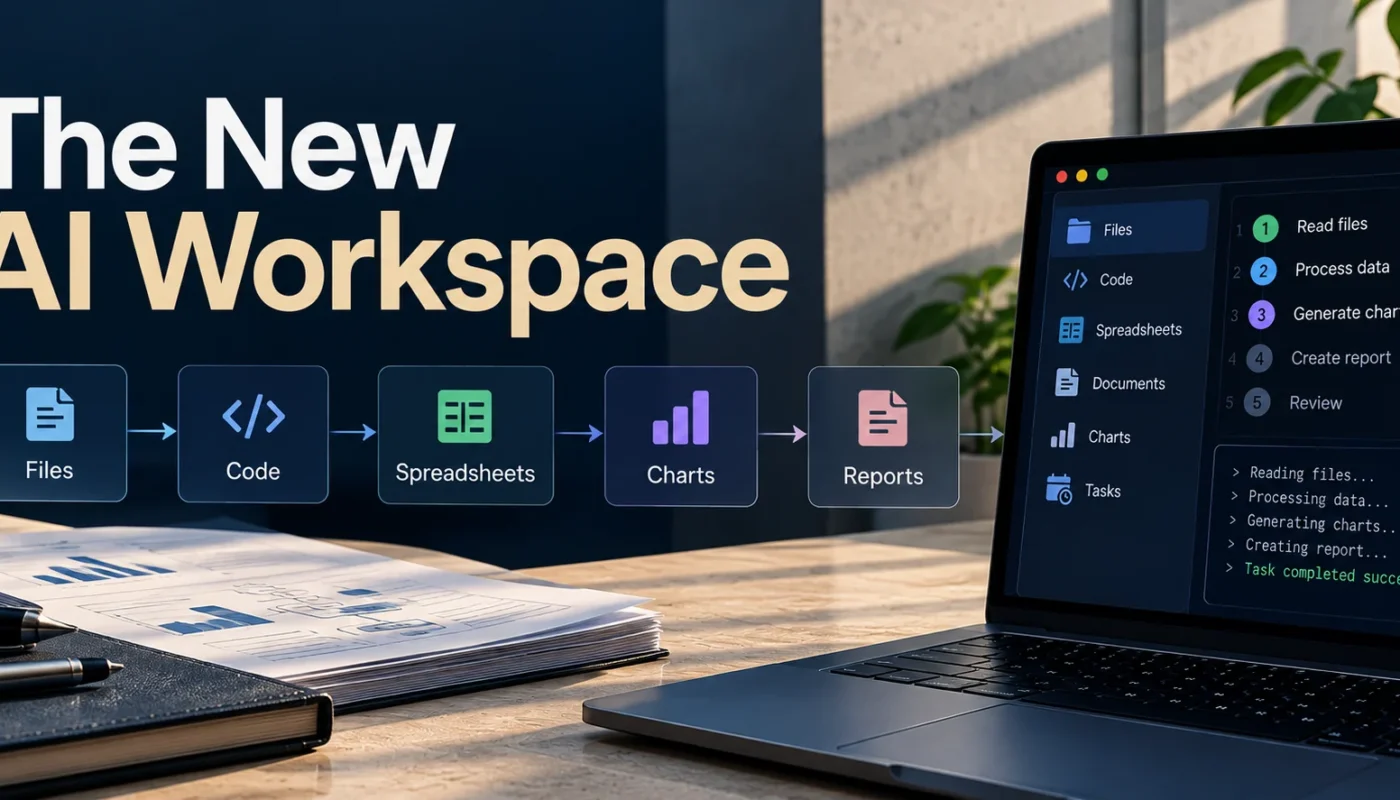
A model can write a function, explain a research paper, or summarize a spreadsheet in seconds. But the work rarely ends there. The code still needs to run, the findings need to be checked, and the spreadsheet may need to become a report that someone else can actually use.
That gap between generating an answer and completing a task is becoming one of the more interesting problems in AI development.
DeepSeek’s Harness v0.2 desktop announcement brings this problem into focus. The preview, available for macOS and Windows, combines file handling, code execution, output previews, plugin management, and scheduled tasks in a single environment. [1]
The release is part of a broader shift in how AI applications are being built. Instead of treating a model as a conversational interface, developers are connecting it to tools, execution environments, and feedback mechanisms that allow it to participate in actual workflows.
The important question is no longer just how intelligently a model responds. It is how reliably the surrounding system can turn that intelligence into useful work.
The Shift From Generative AI to Executable Workflows
Most generative AI applications follow a familiar pattern. A user supplies an instruction, the model generates an answer, and the user decides what to do next. This approach works well for drafting, brainstorming, summarization, and tasks where the main output is information.
The limitations become more apparent when a task involves several dependent operations. Preparing a technical report might require reading documents, extracting data, comparing findings, generating charts, and assembling the results into a final document. An AI assistant may help with each step, but the user often remains responsible for coordinating the process.
An AI agent approaches the problem differently. It works toward a defined objective by selecting tools, carrying out actions, examining the results, and deciding what to do next. Rather than producing only a response, it can participate in the sequence of operations needed to produce a deliverable.
Consider a developer who asks an agent to investigate a bug in a React application. A conventional chatbot might explain the likely cause and suggest a code change. An agent with appropriate project access could inspect the relevant files, modify the implementation, run tests, examine the errors, and present the changes for review.
DeepSeek Harness applies this idea beyond coding. Its announcement describes workflows involving documents, spreadsheets, PDFs, charts, slide decks, HTML pages, and software projects. Users can inspect generated files and code changes within the conversation, then request revisions or open the files in their local applications. [1]
A First-Hand Test of Desktop Automation
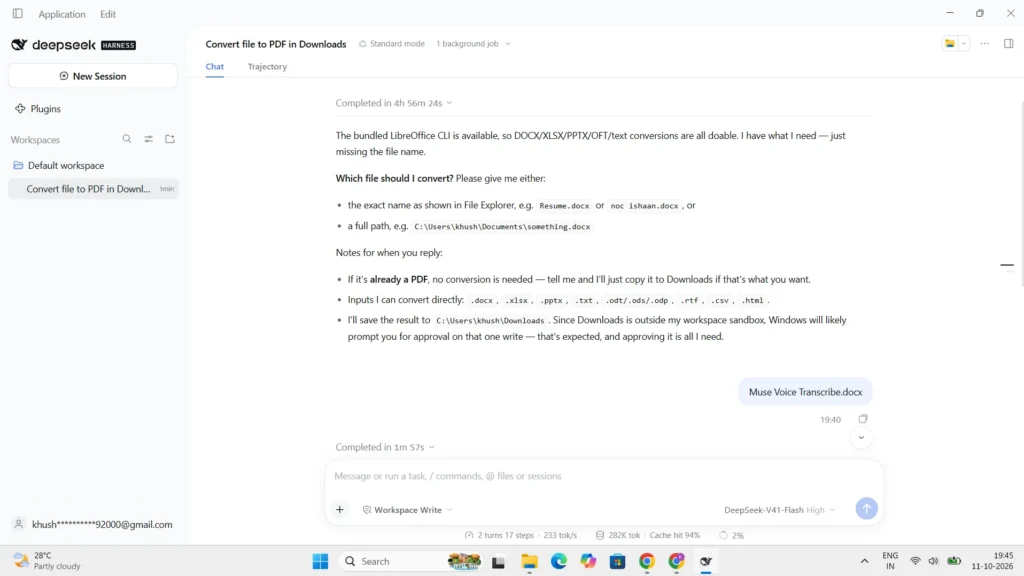
To examine how DeepSeek Harness handles a practical desktop task, I tested it on my Windows laptop. I asked it to convert a file from File Explorer into a PDF and save the result in the Downloads folder.
Rather than selecting a file arbitrarily, the system asked me to specify which file I wanted to convert. After I provided the filename, it completed the conversion and saved the resulting PDF in the requested location. The task worked as expected, without requiring me to perform the conversion manually.
This simple test illustrates two useful aspects of desktop automation. The system could carry out a practical instruction while requesting clarification when the target file was ambiguous. It also highlights the importance of user control. An agent that confirms which file it should act on can reduce the risk of unintended operations, although this single test does not establish its overall reliability.
The interaction provides a concrete example of how the workflow handles an ambiguous instruction. The following screenshots document the clarification step and the resulting file, showing both the system’s interaction with the user and the output produced.

This is the central idea behind an AI workspace: the environment is organized around the work a person wants to complete, rather than around the answer to an individual prompt.
The concept is not entirely new. Coding agents already work with repositories and development tools, while automation platforms connect applications and execute repetitive processes. What is changing is the attempt to bring more of these capabilities into a connected environment that can support different kinds of work.
However, giving an agent more tools does not automatically make it more autonomous or reliable. A system may execute every step in a workflow and still produce an incorrect result if an early assumption was wrong. A generated chart can be visually convincing while representing faulty data, just as a code change can introduce a defect even when the agent reports success.
This is why task execution, output validation, and human oversight need to be considered separately. The real value of a workspace depends on whether it can produce results that are not only complete but also correct and verifiable.
Inside the AI Harness Architecture
An AI model can interpret instructions, reason about a problem, and decide which action might help. It does not automatically have access to every file, application, or execution environment required to carry out that action.
That connection is provided by the surrounding software infrastructure, often called an AI harness.
A harness connects a model to tools and coordinates how those tools are used. Depending on the implementation, it may manage tool invocation, execution, intermediate state, feedback, permissions, and the presentation of results. The model contributes reasoning and decision-making, while the harness supplies the mechanisms needed to interact with an external environment.
The distinction becomes clearer when a task fails.
Suppose an agent changes a function in a software project and runs the relevant tests. If a test fails, the agent needs access to the error message, enough context to interpret it, and a way to attempt another change. Without this feedback, it may simply return the original implementation and describe it as fixed.
A capable system supports an iterative cycle of observation, action, and evaluation. The agent performs an action, receives information about its outcome, and uses that information to determine the next step.
A simplified implementation of this process can be built around a tool registry, which defines the operations an agent is allowed to invoke. The harness dispatches each requested action, captures its output, and returns an observation that can inform the next decision. The following Python example illustrates this execution layer. The action sequence is predefined, so it demonstrates tool orchestration rather than a complete model-powered agent.
CODE EXAMPLE 01 · TOOL EXECUTION
def count_words(text):
    return len(text.split())
tools = {
    "count_words": count_words
}
actions = [
    {
        "tool": "count_words",
        "arguments": {
            "text": "AI workspaces connect models to tools."
        }
    }
]
observations = []
for action in actions:
    tool = tools.get(action["tool"])
    if tool is None:
        observation = {
            "ok": False,
            "error": "Tool is not allowed"
        }
    else:
        try:
            result = tool(**action["arguments"])
            observation = {
                "ok": True,
                "result": result
            }
        except Exception as exc:
            observation = {
                "ok": False,
                "error": str(exc)
            }
    observations.append(observation)
print(observations)
Figure 3. A simplified tool-execution layer in an AI harness. The system dispatches an approved tool, captures its result or error, and stores the observation for subsequent processing. The example uses a predefined action sequence rather than a live language model.
This does not guarantee success, but it gives the system a way to respond to evidence instead of relying entirely on its initial prediction.
Several engineering components influence the quality of this process. Tool interfaces define the operations available to the model. Execution environments determine where code and commands run. State management preserves relevant information across steps, while feedback mechanisms return results and errors. Permission controls restrict which resources the agent can access.
These responsibilities may be distributed across several components rather than implemented inside one central module. An AI harness is therefore best understood as an architectural role, not a single standardized design.
AI HARNESS · EXECUTION LOOP
→
→
Output & Validation
Feedback returns to the model for the next decision.
Figure 4. A conceptual AI harness loop connecting model decisions, tool execution, and feedback.
DeepSeek Harness provides a practical example through its support for code execution, project modifications, file previews, and reviewable changes. Its interface helps users inspect what has been produced rather than relying solely on the agent’s explanation. [1]
There is an important limitation, though. A desktop interface does not necessarily give an agent unrestricted control over the computer, and a harness cannot eliminate every error made by the model or its tools. The system’s actual capabilities depend on the operations it supports, the permissions granted, and how it handles unexpected results.
This distinction also explains why comparing AI products solely by the models they use can be misleading. Two applications built around similarly capable models may behave very differently because their tool orchestration, execution controls, and feedback mechanisms differ.
The model determines much of what the system can reason about. The harness influences how that reasoning is translated into action.
Plugins and the Move Toward Composable AI
A fixed set of built-in tools can support common tasks, but it cannot anticipate every workflow users might need. A researcher may require a specialized document processor, a developer may want a particular testing utility, and a business team may need an integration with its existing software.
A plugin architecture allows these capabilities to be added separately from the core application.
DeepSeek Harness introduces a plugin manager through which users can install plugins by entering package names, inspect descriptions and origins, disable extensions, or remove them. Its experimental creator mode can also help users create or configure plugins by describing the capability they want. [1]
Imagine a workflow that reads a collection of PDFs, extracts information, performs calculations, and prepares a report. Different tools could handle document processing, data analysis, and file generation. The agent coordinates the workflow, while each tool performs a more specialized operation.
This approach can make an AI workspace more adaptable. It also creates a development ecosystem in which third-party contributors can expand the capabilities of the core product.
But extensibility introduces complexity. Each integration can bring dependencies, incompatible interfaces, unexpected outputs, or additional security risks. A plugin that returns data in an unexpected format may disrupt a workflow, while an extension with broad file or command access can expose resources that the user did not intend to share.
Interoperability, version compatibility, and plugin provenance therefore become engineering requirements rather than minor conveniences. Users need to understand where extensions come from, what they can access, and whether they remain compatible as the application evolves.
DeepSeek’s announcement identifies plugin discovery, API stability, and compatibility across versions as areas for continued development. These details matter because a plugin ecosystem is useful only when its components can be installed, maintained, and operated predictably. [1]
The same trade-off applies across the wider AI industry. More integrations can make an agent useful for more tasks, but the number of available tools is not a meaningful measure of reliability on its own. A smaller set of dependable integrations may be more valuable than a large collection of poorly maintained ones.
For AI workspaces to become platforms rather than collections of experimental features, their ecosystems need to be flexible without becoming difficult to secure or maintain.
How the New AI Workspaces Compare
DeepSeek Harness is entering a market in which several products are exploring how AI can interact with tools and carry out multi-step work. Their capabilities overlap, but their primary use cases and engineering priorities differ.
DeepSeek Harness combines desktop-oriented file and development workflows with plugin management and scheduled tasks. Its v0.2 announcement emphasizes customizable capabilities and the ability to inspect generated files and code changes. This makes it a useful case study for examining how a general working environment can connect AI reasoning with practical execution. [1]
Claude Cowork focuses on knowledge work across files and connected applications. Anthropic’s official product guide describes workflows involving local files, spreadsheets, presentations, subagents, and scheduled tasks. Its emphasis is particularly relevant to work that involves moving information between applications and producing finished deliverables. [2]
OpenAI Codex takes a more software-development-oriented approach. Its official app announcement describes an environment for managing multiple coding agents, running tasks in parallel, and coordinating longer-running development work. It is therefore a useful comparison when examining agent orchestration and software engineering workflows. [3]
Google Antigravity also focuses on agent-oriented development. Google’s Antigravity 2.0 announcement describes a standalone desktop application for interacting with agents and reviewing the artifacts they produce, alongside support for more complex development workflows. [4]
The differences become clearer when these environments are compared by their intended use and the workflows they support. The following table summarizes their documented focus. It is not a ranking of their performance or reliability.
COMPARISON · AI WORKSPACE DESIGN
| Workspace | Primary focus | Workflow capabilities highlighted |
|---|---|---|
| DeepSeek Harness | General work and coding in a configurable environment | File and document workflows, code execution, previews, extensible plugins |
| Claude Cowork | Knowledge work across files and connected applications | Document and spreadsheet creation, cross-app tasks, subagents, scheduled work |
| OpenAI Codex | Software development and coding-agent coordination | Parallel coding tasks, multiple agents, longer-running development workflows |
| Google Antigravity 2.0 | Agent-first development and task coordination | Parallel agents, asynchronous tasks, reviewable artifacts, scheduled tasks |
Comparison based on documented product focus and capabilities, not independent benchmark results. Availability and feature access may vary by release, platform, or plan.
Table 1. A comparison of four AI workspaces by their documented design priorities and workflow capabilities. The categories describe product focus rather than measured differences in task success, speed, or safety.
These products should not be treated as interchangeable. A knowledge-work agent has different priorities from a coding environment, and a system that coordinates multiple agents introduces different engineering questions from one focused on a single sequence of tool calls.
A meaningful evaluation should examine execution reliability, tool integration, intermediate-state visibility, permission controls, and the amount of human intervention required. It should also consider whether users can inspect changes, recover from failures, and understand how a result was produced.
The evidence needs to be handled carefully. Product documentation can establish which capabilities a company says its software supports, but it does not independently establish that the product performs better than its competitors. Feature availability can also vary by plan, platform, or release stage.
For that reason, we should distinguish between documented capabilities, experimental features, and future plans. We should also avoid ranking these products by performance unless comparable benchmarks or controlled tests support the comparison.
The more useful question is how each system balances flexibility, control, and reliability for the work it is designed to perform.
Reliability, Security, and the Future of AI Workspaces
As agents gain access to files, development tools, and external services, mistakes can have consequences beyond an incorrect response.
An agent might modify the wrong file, execute an unsuitable command, or produce a report based on a value it extracted incorrectly. A scheduled workflow can repeat an error, while a poorly secured plugin can introduce risks that extend beyond the task it was installed to perform.
This makes reliability engineering a central concern for AI workspaces.
Consider a workflow that extracts data from documents, analyzes it, and generates a report. If the extraction step introduces an error, subsequent calculations and visualizations may still execute successfully. The final document can look polished while its conclusions are wrong.
A useful way to understand this problem is to consider how individual step reliability affects an entire workflow. Even when each action succeeds most of the time, a sequence of dependent actions can be considerably less reliable overall.
FORMULA 1 · WORKFLOW RELIABILITY
Where:
p = probability that an individual step succeeds
n = number of steps in the workflow
Pworkflow = probability that every step succeeds
Formula 1. A simplified model of end-to-end workflow reliability. The calculation assumes independent steps with equal success probabilities. Real AI workflows may have dependent errors, retries, and validation mechanisms that change the outcome.
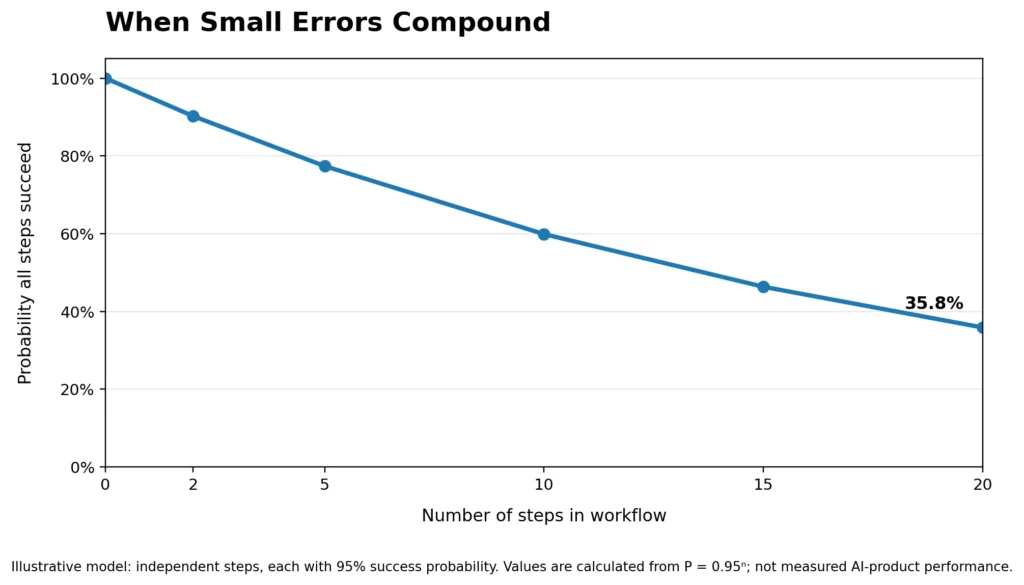
Figure 5. Theoretical workflow reliability declines as independent steps accumulate, even when each step has a 95% success probability.
This is why end-to-end evaluation matters. Measuring whether an individual tool call succeeds does not establish whether the overall task has succeeded. A meaningful evaluation must consider the accuracy of the final result, the number of failures, the time required, and whether human intervention was necessary.
Observability is equally important. Users and developers need enough information to understand which actions were performed, what results were returned, and where a workflow went wrong. Inspectable changes, useful error messages, and execution records make it easier to identify problems before they affect downstream work.
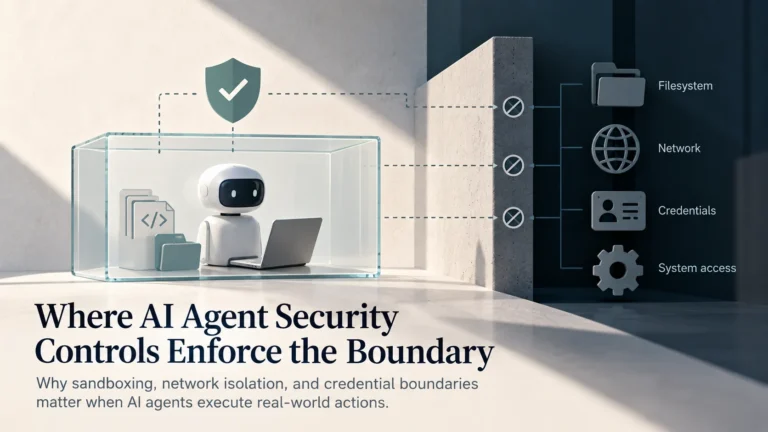
Security presents a related challenge. Sandboxing can restrict where code executes, while least-privilege access limits the resources available to an agent or plugin. Execution auditing can help users investigate what happened during a task. Each mechanism addresses a different risk, and none provides complete protection on its own. [5]
A sandbox may be misconfigured, an agent may misuse permissions it legitimately possesses, and an audit log may reveal an incident without preventing it. Effective safeguards must reflect the actual capabilities of the tools, the sensitivity of the information involved, and the potential consequences of an action. [5]
ENGINEERING TAKEAWAY
A useful agent should have only the access its task requires.
Use isolated execution environments for untrusted code, restrict file and service permissions, require confirmation for consequential actions, and retain logs that help explain what happened. These controls address different risks and should be designed together.
Scheduled automation adds another consideration. Repeating a workflow can save time, but it can also repeat a mistake. Users need clear instructions, appropriate execution limits, and ways to inspect results or stop a task when necessary.
DeepSeek’s announcement lists stronger sandbox capabilities and security, personalized long-term memory, more effective agent teams, and broader browser and graphical-interface automation among its future development priorities. These are stated plans, not evidence that every capability is already available in Harness v0.2. [1]
The broader direction is nevertheless significant. AI applications are increasingly being designed around action, feedback, and workflow coordination, rather than content generation alone. Some systems emphasize software development, others general knowledge work, and others the infrastructure required to build and deploy agents.
Their usefulness will depend on how effectively they combine model capability with reliable execution and meaningful supervision. Risk management should be built into the system throughout its lifecycle, rather than treated as a final checklist. [6]
For everyday users, the objective should not be unrestricted automation. It should be an environment that can take on useful work while making its actions understandable and keeping sensitive operations under appropriate control.
DeepSeek Harness offers a timely example of this transition. Its desktop preview brings several AI-assisted workflows together, but the more important development is the effort to organize software around the work people need to complete.
The next phase of AI will be shaped not only by smarter models, but also by the systems that connect those models to real tasks. The real measure of an AI workspace is how consistently it can turn its capabilities into correct, useful, and verifiable results.
References
- DeepSeek. Harness v0.2: Desktop Preview. 2026.
View source - Anthropic. Claude Cowork: Product Overview. 2026.
View guide - OpenAI. Introducing the Codex App. 2026.
View announcement - Google. Introducing Google Antigravity 2.0. 2026.
View announcement - OWASP. Top 10 for Agentic Applications. 2026.
View guidance - NIST. AI Risk Management Framework. 2023.
View framework